“Qase’s Azure DevOps Defect Integration Is a Huge Win”
Paul Joshua C.
Software QA Engineer, Information Technology and Services, Mid-Market (51-1000 emp.)
View case study →Link Qase test cases, test runs, and defects with Azure DevOps work items so testing and development teams stay coordinated.



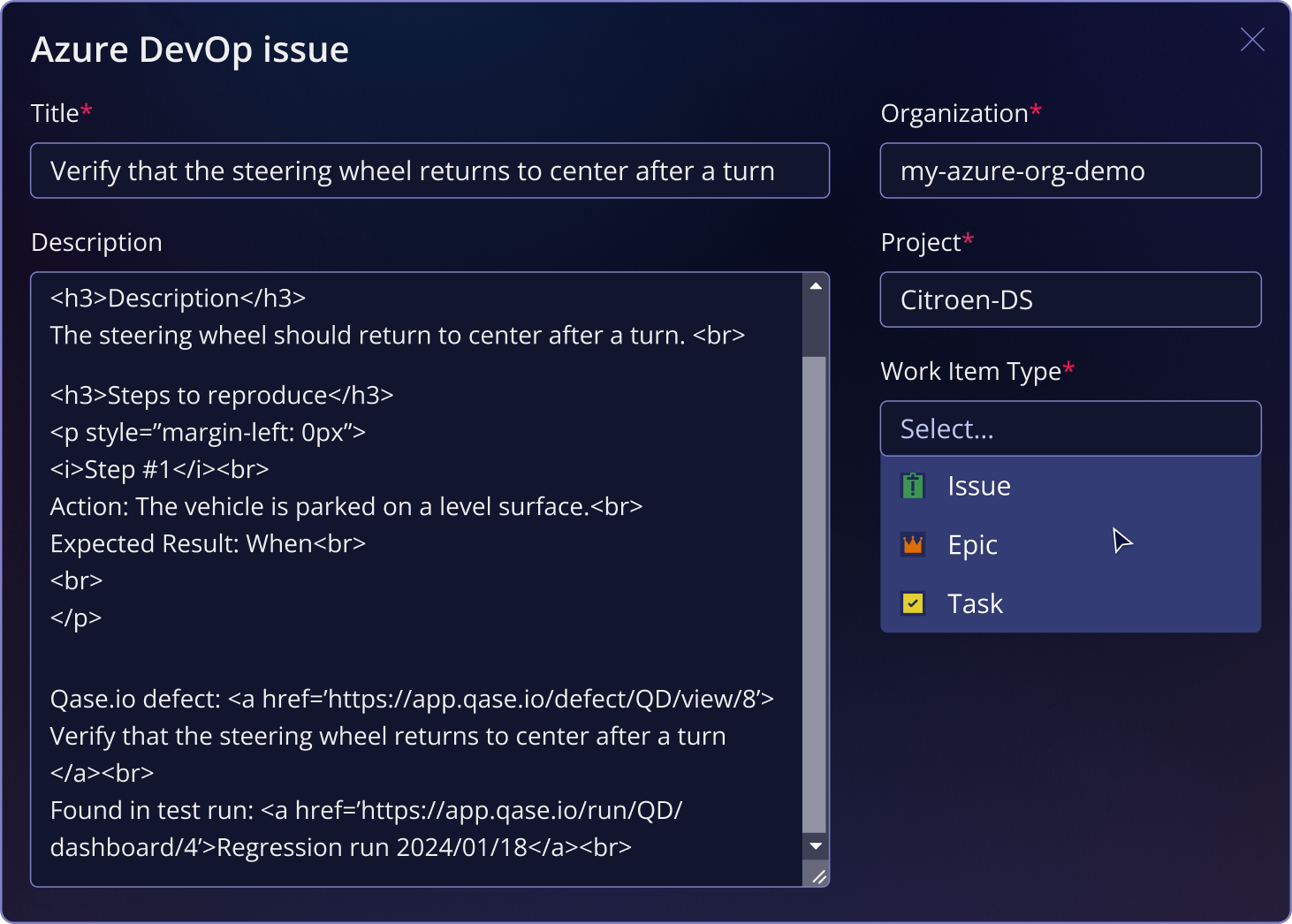
The Qase integration with Azure DevOps lets teams associate test artifacts with Azure DevOps work items and create work items directly from failed tests. Linked defects keep status aligned between Qase and Azure DevOps, helping QA and engineering share up-to-date quality insights without switching between systems.

“Qase’s Azure DevOps Defect Integration Is a Huge Win”
Paul Joshua C.
Software QA Engineer, Information Technology and Services, Mid-Market (51-1000 emp.)
View case study →“Another best thing is integration with DevOps Azure. You can create a bug straightaway from Qase to Azure Board.”
Verified User in Hospital & Health Care
View case study →“The most helpful feature of Qase is its defect integration with Azure DevOps and other bug management tools”
Paul Joshua C.
Software QA Engineer, Information Technology and Services, Mid-Market (51-1000 emp.)
View case study →